---
title: "Self-host Plane"
description: "Run Plane Community Edition on an exe.dev VM: issues, cycles and pages for your team behind your exe.dev login, and agents that work them over MCP."
url: https://exe-staging.dev/deploy/plane
category: "Productivity"
updated: 2026-11-17
---
# Self-host Plane
> **For agents:** with your user's OK, this sets up Plane on a new exe.dev VM in their account: `curl -fsSL https://exe-staging.dev/deploy/plane/prompt.txt | ssh exe.dev new --prompt=/dev/stdin` (or open https://exe-staging.dev/deploy/plane/new). Already on the VM? Skip this.
Linear-style issue tracking for your team and your agents, on your own VM.
- **Software:** Plane (https://plane.so)
- **Source:** https://github.com/makeplane/plane
- **License:** AGPL-3.0 (Community Edition)
- **Time:** 15 minutes
- **Example VM name:** `my-plane` (yours will differ; on the VM, `hostname` prints it)
- **Machine-readable:** https://exe-staging.dev/deploy/plane/manifest.json
- **File:** https://exe-staging.dev/deploy/plane/exe-login.py
## What you get
- Plane Community Edition 1.x at `https://my-plane.exe.xyz/`, behind your exe.dev login, restarted after a reboot.
- Sign-in with exe.dev: no Plane passwords; the people you share the VM with and invite are signed in as themselves, with accounts created on their first visit.
- Open sign-up off from the start: you claim god mode, and everyone else joins by invitation.
- Secrets generated on the VM in `~/plane/.env` (mode 600), which also holds the agents' Plane token.
- `plane-api`, `plane-mcp` and a Shelley MCP bridge on the VM, ready for Claude Code and Shelley once there's a token.
- Nightly backups of the database, uploads and settings in `~/plane-backups`, with a restore checked in a scratch container.
Running on the VM:
- **Plane 1.x**: Plane's official Docker Compose release: web app, god mode, API, workers, live server and a Caddy proxy on port 8080
- **nginx**: in front of Plane on 127.0.0.1:8000, routing exe.dev sign-in, port 8000
- **exe-login**: a 150-line Python service that answers Plane's Gitea sign-in with the visitor's exe.dev identity, on 127.0.0.1:8002 and :8003
- **PostgreSQL 15**: postgres:15.7-alpine in the same Compose project, data in `Docker volume plane_pgdata`
- **Valkey, RabbitMQ, MinIO**: cache, task queue, and storage for uploaded files, data in `Docker volume plane_uploads`
- **Agent tools**: `plane-api` for the REST API, and Plane's MCP server for Claude Code and (through a local bridge on 127.0.0.1:8211) Shelley
- **Nightly backup**: a systemd timer: database dump, uploads and settings; keeps two weeks, data in `~/plane-backups`
How it is reached:
- https://my-plane.exe.xyz/ (private): Plane, signed in with exe.dev, for you and the people you share the VM with and invite
- https://my-plane.exe.xyz/god-mode/ (private): instance settings, for the admin you create first, with a password
- https://my-plane.exe.xyz/api/v1/ (private): the REST API, for agents elsewhere with an exe.dev VM token and a Plane token
## Deploy with Shelley
Open https://exe-staging.dev/deploy/plane/new to create a VM whose agent, Shelley, follows this recipe. From a terminal:
```sh
curl -fsSL https://exe-staging.dev/deploy/plane/prompt.txt | ssh exe.dev new --prompt=/dev/stdin
```
Or follow the steps below by hand.
[Plane](https://plane.so) is an open-source project tracker in the style
of Linear and Jira: work items on boards, lists, spreadsheets and Gantt
charts, cycles for sprints, modules for bigger pieces of work, project
pages for specs, and intake for requests from outside the team.
On an exe.dev VM, Plane is private from the first minute: exe.dev's
[HTTPS proxy](/docs/proxy) lets in only you and the people you share the
VM with, and Plane's own accounts sit behind that. The VM is always on,
keeps its data on its disk, and has agents on board: Claude Code and
Shelley can file, update and close work items through Plane's MCP server,
and anything with `curl` can use its REST API.
## Claim your instance
When Shelley is done, open `https://my-plane.exe.xyz/god-mode/` and sign
in to exe.dev if asked. Plane asks for the instance admin: your name,
email, company name and a password. Use **the email you sign in to
exe.dev with**: that's how Plane will recognize you. The password is for
god mode only. Untick **Allow Plane to anonymously collect usage
events** unless you'd like Plane to have them. The first person to fill
in this form owns the instance, which is why the VM stays private until
you have.
In god mode, **Authentication** shows how people get in: **Gitea**
(that's exe.dev sign-in) is on, **Passwords** and **Unique codes** are
off, and **Allow anyone to sign up even without an invite** is off, so
people join your Plane only by invitation. Leave it that way.
Now open `https://my-plane.exe.xyz/`. You're signed in with exe.dev
straight away. Plane asks for your name, then a workspace: its URL slug
(for example `acme` in `https://my-plane.exe.xyz/acme/`) is what agents
will need later. Plane starts you with a project named after the
workspace and a few sample work items to poke at.
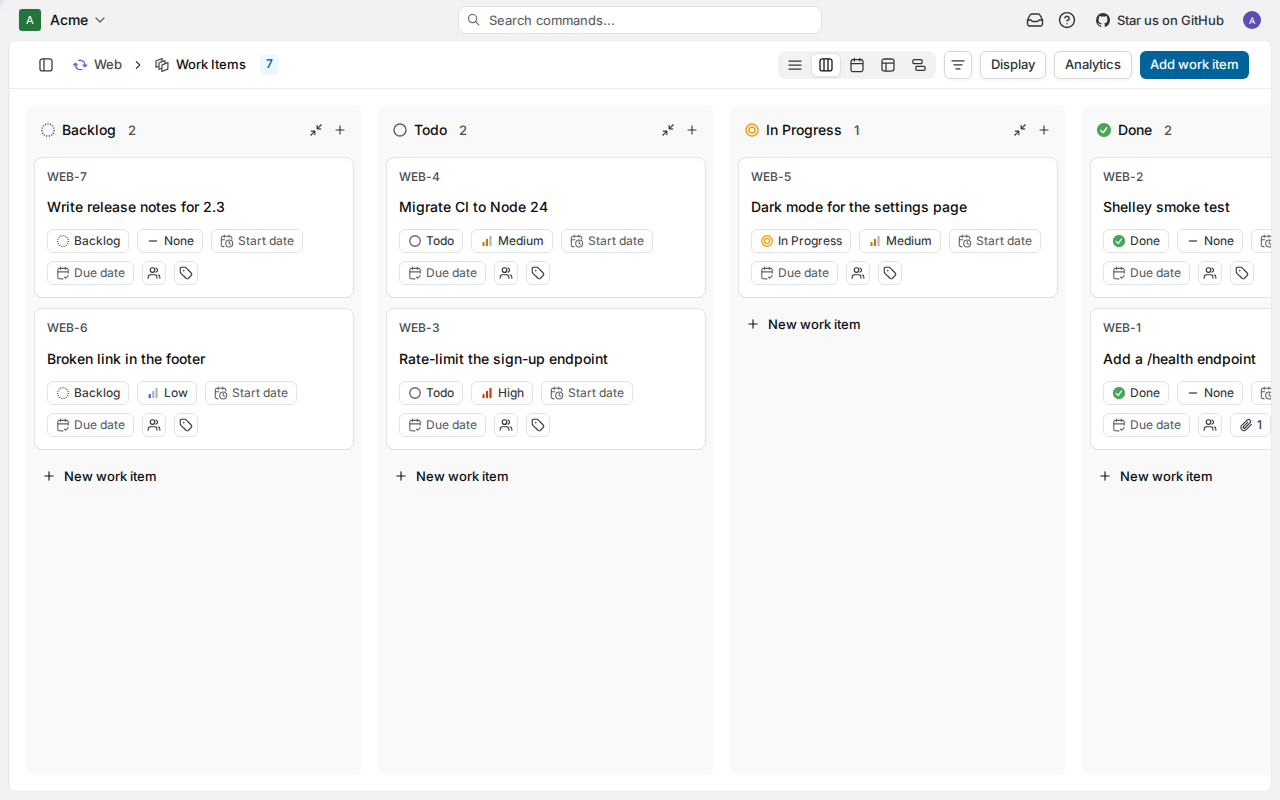
A project's board. Claude Code filed and closed WEB-1 over MCP; Shelley did WEB-2.
## Bring your team
A teammate needs two things: access to the VM, and an invitation to the
workspace. On your computer, [share the VM](/docs/sharing) with their
email:
```bash
ssh exe.dev share add my-plane alice@example.com
```
Then, in Plane, open **Workspace settings → Members → Add member**, enter
the same address and pick a role. Without email set up, Plane doesn't send
the invitation; send them the link `https://my-plane.exe.xyz/` yourself.
They sign in to exe.dev if they haven't, land in Plane signed in as
themselves (their account is made on this first visit), and accept the
invitation. Someone you've shared the VM with but not invited sees "sign
up disabled".
**Sign out** in Plane ends the Plane session and leaves you on Plane's
sign-in page; **Sign in with Gitea** there (or opening
`https://my-plane.exe.xyz/` again later) signs you back in as whoever
you're signed in to exe.dev as. To be someone else, sign out of exe.dev
at `https://my-plane.exe.xyz/__exe.dev/logout`, or use another browser
profile signed in to exe.dev as them.
To send invitations and notifications by email, enter
any SMTP provider's details under **God mode → Email**. exe.dev's own
[email gateway](/docs/send-email) only mails the VM's owner, so it isn't
a fit here.
## Connect your agents
Agents sign in to Plane with a personal access token. In Plane, open your
avatar's menu → **Settings → Personal Access Tokens → Add access token**,
name it `agents`, choose an expiry (or **Never expires**), and copy the
`plane_api_…` key. It's shown once.
The token acts as you: what agents create is shown as yours. To tell them
apart, invite a member such as `agents@example.com`, sign up as it in a
private window, and make the token there.
On the VM (`ssh my-plane.exe.xyz`), save the token and your workspace's
slug in `~/plane/.env`, the one file that holds Plane's secrets, then
list your projects to check:
```bash
read -rsp 'Plane token: ' token; echo
read -rp 'Workspace slug (as in https://.../acme/): ' slug
sed -i '/^PLANE_API_KEY=/d;/^PLANE_WORKSPACE_SLUG=/d' ~/plane/.env
printf 'PLANE_API_KEY=%s\nPLANE_WORKSPACE_SLUG=%s\n' "$token" "$slug" >> ~/plane/.env
plane-api GET /projects/ | jq -r '.results[] | "\(.identifier) \(.name)"'
```
Expect each project's identifier (the `WEB` in `WEB-12`) and name.
**Claude Code**, on this VM. Its login goes through exe.dev's
[LLM integration](/docs/integrations-llm); `plane-mcp` starts Plane's
[MCP server](https://github.com/makeplane/plane-mcp-server) with the
token from `~/plane/.env`:
```bash
exeuntu configure claude
claude mcp add plane --scope user -- plane-mcp
claude mcp list
```
Expect `plane: plane-mcp - ✔ Connected`.
**Shelley**, on this VM. Shelley speaks MCP over HTTP only, so a small
bridge serves Plane's MCP server on `127.0.0.1:8211`, where nothing
outside the VM can reach it:
```bash
sudo systemctl enable --now plane-mcp
until curl -s -o /dev/null http://127.0.0.1:8211/mcp; do sleep 3; done
shelley mcp add plane -d 'Plane issue tracker on this VM' http://127.0.0.1:8211/mcp
shelley mcp list plane | head -1
```
The bridge's first start downloads the MCP server, so the loop waits
half a minute or so. Expect `plane: Plane MCP Server (stdio) (v3.2.0), 30 tools`
or similar.
After changing the token in `~/plane/.env`, run
`sudo systemctl restart plane-mcp`.
**Anything else** on the VM can use `plane-api METHOD PATH [JSON]`, which
calls Plane's [REST API](https://developers.plane.so/api-reference/introduction)
for your workspace. Create a work item in project `WEB`, comment on it,
and close it:
```bash
PROJECT=$(plane-api GET /projects/ | jq -r '.results[] | select(.identifier=="WEB") | .id')
ITEM=$(plane-api POST /projects/$PROJECT/work-items/ '{"name":"Try the Plane API","priority":"low"}' | jq -r .id)
plane-api POST /projects/$PROJECT/work-items/$ITEM/comments/ '{"comment_html":"
Checked by an agent.
"}' | jq -r .comment_html
DONE=$(plane-api GET /projects/$PROJECT/states/ | jq -r '.results[] | select(.group=="completed") | .id' | head -1)
plane-api PATCH /projects/$PROJECT/work-items/$ITEM/ "{\"state\":\"$DONE\"}" | jq '{sequence_id, completed_at}'
```
Use your own project's identifier for `WEB`. The last line prints the
item's number and the time Plane marked it complete.
### From your computer or another VM
The REST API is at `https://my-plane.exe.xyz/api/v1/`, behind exe.dev's
login like the rest of Plane. Agents send an exe.dev VM token for the
proxy and the Plane token for Plane. On your computer:
```bash
ssh exe.dev ssh-key generate-api-key --vm=my-plane --label=plane-agents --exp=90d
```
Then, with both tokens:
```bash
curl -s https://my-plane.exe.xyz/api/v1/workspaces/acme/work-items/WEB-1/ \
-H "X-Exedev-Authorization: Bearer exe1.paste-yours-here" \
-H "X-API-Key: plane_api_paste-yours-here" | jq '{name, completed_at}'
```
exe.dev's proxy checks and removes the first header
([HTTPS tokens for VMs](/docs/https-tokens-for-vms)); Plane checks the
second. Plane allows 60 API requests a minute per token.
## Try it
In `claude` on the VM, or in a Shelley conversation:
> In Plane project WEB, file a work item for each TODO comment in
> ~/src/api, with the file and line in the description.
> Take the highest-priority unstarted work item in WEB, move it to In
> Progress, do it, comment what you changed, and move it to Done.
> Summarize what's in the current cycle of WEB and what's blocked.
Plane's MCP server also has tools for Commercial Edition features
(customers, releases, work logs, templates); on this edition those calls
fail, and the agent moves on.
## The nuts and bolts
Happy with what Shelley set up? Stop here. Below are the steps it
followed, and maintenance for later.
Set up by hand
### Create the VM
On your computer (pick another name if `my-plane` is taken):
```bash
ssh exe.dev new --name=my-plane
ssh my-plane.exe.xyz
```
Everything else runs **on the VM**.
### Write the settings
Start Docker at boot, so Plane comes back after a reboot:
```bash
sudo systemctl enable --now docker.service
systemctl is-enabled docker.service
```
Expect `enabled`. Download Plane's Compose file for one release, and
generate its settings and secrets **once** (this leaves an existing
`.env` alone):
```bash
mkdir -p ~/plane && cd ~/plane
PLANE_VERSION=v1.5.0
curl -fsSL -o docker-compose.yaml \
"https://github.com/makeplane/plane/releases/download/$PLANE_VERSION/docker-compose.yml"
if [ ! -e .env ]; then
touch .env && chmod 600 .env
PG_PASSWORD=$(openssl rand -hex 24)
MQ_PASSWORD=$(openssl rand -hex 24)
cat >> .env < ~/plane/docker-compose.override.yaml <<'EOF'
# Additions to Plane's docker-compose.yaml: sign in with exe.dev.
# Docker Compose reads this file automatically; ${...} come from .env.
services:
api:
extra_hosts:
- "${APP_DOMAIN}:host-gateway"
environment:
ENABLE_SIGNUP: "0"
ENABLE_EMAIL_PASSWORD: "0"
ENABLE_MAGIC_LINK_LOGIN: "0"
IS_GITEA_ENABLED: "1"
GITEA_HOST: http://${APP_DOMAIN}/exe-login
GITEA_CLIENT_ID: ${GITEA_CLIENT_ID}
GITEA_CLIENT_SECRET: ${GITEA_CLIENT_SECRET}
EOF
```
`GITEA_HOST` is an `http://` address on purpose. People's browsers follow
it to exe.dev's proxy, which redirects them to `https://` and then to
this VM with their exe.dev identity. Plane's API server, inside Docker,
reaches the same name at this VM (that's the `extra_hosts` line) to swap
the sign-in code for the person's email, over plain HTTP, without leaving
the VM.
### Add exe.dev sign-in
[exe-login.py](https://exe-staging.dev/deploy/plane/exe-login.py) is about 150
lines of Python with no dependencies. It speaks the three calls of
Gitea's OAuth API that Plane makes, and answers with the person exe.dev's
proxy says is visiting (the `X-ExeDev-Email` header). It stores nothing.
Install it as a service:
```bash
curl -fsSL -o ~/plane/exe-login.py https://exe-staging.dev/deploy/plane/exe-login.py
sudo tee /etc/systemd/system/plane-exe-login.service >/dev/null <<'EOF'
[Unit]
Description=Sign in to Plane with exe.dev (127.0.0.1:8002 and :8003)
After=network-online.target
[Service]
User=exedev
ExecStart=/usr/bin/python3 /home/exedev/plane/exe-login.py
Restart=on-failure
[Install]
WantedBy=multi-user.target
EOF
sudo systemctl daemon-reload
sudo systemctl enable --now plane-exe-login
```
nginx (already on the VM, switched off) goes in front of Plane on port
8000. It passes everything to Plane, except that the sign-in page sends
signed-out visitors straight to exe.dev sign-in (but not right after
**Sign out**, which would sign them straight back in), and that
`/exe-login/login/oauth/authorize` goes to exe-login. A second server on
port 80, open only to the VM itself and its Docker containers, serves
exe-login's other two calls, with any `X-ExeDev-*` headers removed:
```bash
sudo tee /etc/nginx/conf.d/plane.conf >/dev/null <<'EOF'
# Plane behind exe.dev's proxy, with exe.dev sign-in (~/plane/exe-login.py).
map $http_upgrade $connection_upgrade {
default upgrade;
'' close;
}
map $http_cookie $plane_session {
default 0;
"~(^|;)\s*session-id=" 1;
}
map "$plane_session:$args" $exe_sign_in {
default 0;
"0:" 1;
"~^0:next_path=[^&]*$" 1;
}
# Port 8000: everything from exe.dev's proxy.
server {
listen 127.0.0.1:8000;
absolute_redirect off;
client_max_body_size 0;
proxy_http_version 1.1;
proxy_set_header Host $http_host;
proxy_set_header Upgrade $http_upgrade;
proxy_set_header Connection $connection_upgrade;
proxy_request_buffering off;
proxy_buffering off;
proxy_read_timeout 1h;
location = /exe-login/login/oauth/authorize {
proxy_pass http://127.0.0.1:8002/login/oauth/authorize;
}
location /exe-login/ {
return 404;
}
location = / {
if ($exe_sign_in) {
return 302 /auth/gitea/$is_args$args;
}
proxy_pass http://127.0.0.1:8080;
}
location = /auth/sign-out/ {
proxy_pass http://127.0.0.1:8080;
proxy_redirect ~^https?://[^/]+/?$ /?signed_out=1;
}
location / {
proxy_pass http://127.0.0.1:8080;
}
}
# Port 80: Plane's API server, in Docker, asking exe-login who signed in.
server {
listen 80;
allow 127.0.0.1;
allow 172.16.0.0/12;
deny all;
proxy_set_header X-ExeDev-Email "";
proxy_set_header X-ExeDev-UserID "";
location = /exe-login/login/oauth/access_token {
proxy_pass http://127.0.0.1:8003/login/oauth/access_token;
}
location ~ ^/exe-login(/api/v1/user(/emails)?)$ {
proxy_pass http://127.0.0.1:8003$1;
}
location / {
return 404;
}
}
EOF
sudo rm -f /etc/nginx/sites-enabled/default
sudo nginx -t && sudo systemctl enable nginx && sudo systemctl restart nginx
curl -s -o /dev/null -w 'sign-in page %{http_code} -> %{redirect_url}\n' http://localhost:8000/
```
Expect `syntax is ok`, then `sign-in page 302 -> http://localhost:8000/auth/gitea/`
(curl shows the relative redirect in full).
### Start Plane
Pull the images (about 4.5 GB) and start the twelve containers. The first
start runs Plane's database migrations, which takes five to ten minutes
on a default VM; this waits for the API to answer:
```bash
cd ~/plane
docker compose pull --quiet
docker compose up -d
until curl -fs -o /dev/null http://localhost:8000/api/instances/; do sleep 10; done; echo ready
```
If it's still waiting after 15 minutes, press Ctrl-C and
[check the logs](#troubleshooting). Then check the sign-in settings, and
that Plane's API server reaches exe-login:
```bash
cd ~/plane
curl -s http://localhost:8000/api/instances/ | jq '{version: .instance.current_version,
admin_exists: .instance.is_setup_done, exe_sign_in: .config.is_gitea_enabled,
passwords: .config.is_email_password_enabled, open_signup: .config.enable_signup}'
docker compose exec -T api python -c \
"import requests; print('exe-login', requests.get('http://$(hostname).exe.xyz/exe-login/api/v1/user').status_code)"
curl -s -o /dev/null -w 'god mode %{http_code}\n' http://localhost:8000/god-mode/
```
Expect `"version": "1.5.0"`, `"admin_exists": false`,
`"exe_sign_in": true`, `"passwords": false`, `"open_signup": false`,
then `exe-login 401` (it answers, and wants a token) and `god mode 200`.
Every container restarts on its own (Plane's file sets
`restart_policy: any`); the `migrator` exits once it's done, which is
normal:
```bash
cd ~/plane && docker compose ps -a --format '{{.Service}}: {{.Status}}'
```
### Add the agent tools
`plane-api` calls the REST API for the workspace in `~/plane/.env`:
```bash
sudo tee /usr/local/bin/plane-api >/dev/null <<'EOF'
#!/bin/bash
# plane-api METHOD PATH [JSON]: call Plane's REST API for the workspace
# in ~/plane/.env, e.g. plane-api GET /projects/
set -euo pipefail
eval "$(grep -E '^PLANE_(API_KEY|WORKSPACE_SLUG)=' ~/plane/.env | sed 's/^/export /')"
: "${PLANE_API_KEY:?no PLANE_API_KEY in ~/plane/.env yet}"
curl -sS --fail-with-body -X "$1" -H "X-API-Key: $PLANE_API_KEY" \
-H 'Content-Type: application/json' ${3:+--data "$3"} \
"http://localhost:8000/api/v1/workspaces/$PLANE_WORKSPACE_SLUG$2"
EOF
sudo chmod 755 /usr/local/bin/plane-api
```
`plane-mcp` runs Plane's MCP server, from PyPI through `uvx`, with the
same token:
```bash
sudo tee /usr/local/bin/plane-mcp >/dev/null <<'EOF'
#!/bin/bash
# Plane's MCP server (stdio), with the token and workspace in ~/plane/.env.
set -euo pipefail
eval "$(grep -E '^PLANE_(API_KEY|WORKSPACE_SLUG)=' ~/plane/.env | sed 's/^/export /')"
export PLANE_BASE_URL=http://localhost:8000
exec uvx --quiet --from 'plane-mcp-server>=0.3.5,<0.4' plane-mcp-server stdio
EOF
sudo chmod 755 /usr/local/bin/plane-mcp
```
For Shelley, which needs MCP over HTTP,
[mcp-proxy](https://github.com/sparfenyuk/mcp-proxy) serves `plane-mcp`
on `127.0.0.1:8211`. Install the unit now; it's started once there's a
token:
```bash
sudo tee /etc/systemd/system/plane-mcp.service >/dev/null <<'EOF'
[Unit]
Description=Plane MCP server over HTTP on 127.0.0.1:8211, for Shelley
After=network-online.target docker.service
Wants=network-online.target
[Service]
User=exedev
ExecStart=/usr/local/bin/uvx --quiet --from 'mcp-proxy>=0.15,<0.16' mcp-proxy --host 127.0.0.1 --port 8211 -- /usr/local/bin/plane-mcp
Restart=on-failure
RestartSec=15
[Install]
WantedBy=multi-user.target
EOF
sudo systemctl daemon-reload
```
### Back up nightly
The database is dumped with `pg_dump` (safe while Plane runs), the
uploaded files are copied out of MinIO's volume, and the settings come
along. The script keeps the 14 newest:
```bash
sudo tee /usr/local/bin/plane-backup >/dev/null <<'EOF'
#!/bin/bash
# Back up Plane to ~/plane-backups/plane-Back up and restore
On the VM, `plane-backup` backs up now and prints the archive's path.
Each archive holds `plane.dump` (the database), `uploads.tar` (attached
files and images), `.env`, `docker-compose.yaml` and
`docker-compose.override.yaml`. Keep them private:
`.env` has every secret. To copy the backups to your computer:
```bash
scp 'my-plane.exe.xyz:plane-backups/plane-*.tar.gz' .
```
### Restore
On the VM, unpack the archive, stop everything that writes, replace the
database and the uploads, and start again:
```bash
backup=~/plane-backups/plane-20261117-033012.tar.gz
rm -rf /tmp/plane-restore && mkdir /tmp/plane-restore && tar -xzf "$backup" -C /tmp/plane-restore
cd ~/plane
docker compose stop api worker beat-worker live proxy plane-minio
docker compose exec -T plane-db dropdb -h /var/run/postgresql -U plane --force plane
docker compose exec -T plane-db createdb -h /var/run/postgresql -U plane plane
docker compose exec -T plane-db pg_restore -h /var/run/postgresql -U plane -d plane --no-owner \
< /tmp/plane-restore/plane.dump
docker run --rm -v plane_uploads:/export busybox:1 find /export -mindepth 1 -delete
docker run --rm -i -v plane_uploads:/export busybox:1 tar -C /export -xf - < /tmp/plane-restore/uploads.tar
docker compose up -d
rm -rf /tmp/plane-restore
```
Plane is back in a minute or two. On a **new VM**, follow
[Set up by hand](#create-the-vm) up to *Start Plane*, but first copy the
archive over and put its `.env` in `~/plane/` (fix the three addresses in
it if the VM's name changed), so `SECRET_KEY` and the storage keys match
the backup. Then restore as above.
Update
Back up first (`plane-backup`). Read the
[release notes](https://github.com/makeplane/plane/releases), then, on
the VM, set the release in both places and restart (this example moves
to `v1.5.1`):
```bash
cd ~/plane
PLANE_VERSION=v1.5.1
curl -fsSL -o docker-compose.yaml \
"https://github.com/makeplane/plane/releases/download/$PLANE_VERSION/docker-compose.yml"
sed -i "s/^APP_RELEASE=.*/APP_RELEASE=$PLANE_VERSION/" .env
docker compose pull --quiet
docker compose up -d
until curl -fs -o /dev/null http://localhost:8000/api/instances/; do sleep 10; done
curl -s http://localhost:8000/api/instances/ | jq -r .instance.current_version
```
The migrator applies any database changes before the API starts. Compare
the release's
[`variables.env`](https://github.com/makeplane/plane/releases) with your
`.env` for new settings. God mode shows when a newer release is out. The
MCP tools update themselves within `0.3.x`; `uv cache clean` forces it.
Something not working?
On the VM, the containers and their logs:
```bash
cd ~/plane
docker compose ps -a
docker compose logs --tail=50 api migrator proxy
systemctl status nginx plane-exe-login --no-pager
```
**`502` or a blank page right after starting.** The API waits for the
database migrations, which take minutes the first time and after
updates; `docker compose logs -f migrator` shows them. After a reboot,
Plane is back within about two minutes.
**`proxy` keeps restarting.** Its Caddy settings come from `.env`: check
`CERT_ACME_CA` is set as above, and that nothing else uses port 8080
(`sudo ss -ltnp | grep ':8080'`).
**Sign-in loops back to the sign-in page, or the browser console shows
CORS errors.** `WEB_URL` and `CORS_ALLOWED_ORIGINS` in `.env` must be
exactly the address in the browser, `https://my-plane.exe.xyz`. Fix them
and run `docker compose up -d`.
**Sign-in ends on Plane's sign-in page with a Gitea error.** Plane
couldn't reach exe-login. Check that Plane's API server gets an answer
(expect `401`):
```bash
cd ~/plane && docker compose exec -T api python -c \
"import requests; print(requests.get('http://$(hostname).exe.xyz/exe-login/api/v1/user').status_code)"
```
A connection error there means nginx isn't listening on port 80, or the
`extra_hosts` line in `docker-compose.override.yaml` is missing (then run
`docker compose up -d`). `502` there, or a `502 Bad Gateway` page at
`/exe-login/...` in the browser, means exe-login is down:
`journalctl -u plane-exe-login -n 50`.
**You forgot the god-mode password, and there's no SMTP.** Set a new one
from the VM (it asks twice):
```bash
cd ~/plane && docker compose exec api python manage.py reset_password you@example.com
```
**A teammate sees "sign up disabled".** They aren't invited, or their
exe.dev email differs from the invitation's. Invite the exact email they
sign in to exe.dev with, under **Workspace settings → Members**.
**`plane-api` or the MCP server says `401` or `403`.** The token is wrong,
expired or deleted; make a new one, save it as in
[Connect your agents](#connect-your-agents), and run
`sudo systemctl restart plane-mcp`. **`429`** means more than 60
requests a minute.
**Shelley can't reach `plane`.** `systemctl status plane-mcp` and
`journalctl -u plane-mcp -n 50` show why; the first start downloads the
MCP server and takes about half a minute. Right after the bridge
restarts, Shelley's first call can fail with `session not found`; the
next one reconnects. `shelley mcp add` says `already exists` when run a
second time, which is fine.
## Frequently asked questions
### Is Plane free? What's paywalled?
The Community Edition you run here is AGPL-3.0, free, with no user limit, matching the Free plan of Plane's cloud: work items, cycles, modules, five layouts and saved views, intake, estimates, project pages, the API and webhooks. The [paid plans](https://plane.so/pricing) need Plane's separate, closed-source Commercial Edition and a license key; they add things like work item types, time tracking, the workspace wiki, templates, dashboards, initiatives, recurring work items, importers from Jira, Linear and Asana, GitHub and Slack integrations, SAML or OIDC sign-in, and approvals. Plane's AI features are paid too.
### How much does it cost to self-host Plane on exe.dev?
Just your [VM plan](https://exe.dev/pricing). Plane's twelve containers use about 1.3 GB of memory when idle and 4.5 GB of disk for images, so a default VM runs it with room to spare. Your agents' model use bills wherever those agents run.
### Can people sign in to Plane with their exe.dev login?
Yes, and on this page it's the only way into the app. Plane's Community Edition has no OIDC, SAML or trusted-header sign-in, but it can sign people in with Gitea at an address you choose. A small service on the VM, exe-login, plays that Gitea and answers with the email exe.dev's proxy vouches for, so anyone you've shared the VM with and invited is signed in as themselves, with no Plane password. Plane still shows the button as **Sign in with Gitea** when it shows its sign-in page: after you sign out, when a session has expired and you open a bookmarked link, or after a refused sign-in.
### Can someone fake their exe.dev identity?
Not from outside. exe.dev's proxy removes any `X-ExeDev-*` headers a browser sends and sets its own, and exe-login's sign-in step listens only on 127.0.0.1, behind nginx. Programs running on the VM itself can send any headers they like, so anyone with a shell on the VM can sign in to Plane as anyone; share SSH access accordingly.
### What if exe-login stops working?
God mode keeps its own password, so the admin can always get in at `/god-mode/`. Under **Authentication**, turn **Passwords** back on to sign in to the app with your god-mode email and password (your teammates have no Plane password; they'd need SMTP set up to reset one), and see [Something not working?](#troubleshooting).
### Why not Plane's setup.sh or the all-in-one image?
This page runs the same `docker-compose.yml` that `setup.sh` downloads, pinned to a release, without the interactive menu, and backs up with `pg_dump` instead of copying a live database's files. The all-in-one `makeplane/plane-aio-community` image still needs PostgreSQL, Redis, RabbitMQ and S3 storage run beside it, so on one VM it saves nothing.
### Do invitations need email?
No. Without SMTP, Plane doesn't send the email, but the invitation still works: the person opens your Plane address, is signed in with exe.dev, and finds the invitation waiting. Add SMTP under **God mode → Email** (any provider) for invitations, password resets and notifications by email.
## Related
- [Self-hosted issue tracker](https://exe-staging.dev/deploy/issue-tracker.md): Choose an issue tracker to run on your own VM, for your team and your agents.
- [Self-host Kaneo](https://exe-staging.dev/deploy/kaneo.md): A light, fully open-source issue tracker that your agents can work from too.
- [Self-host OpenProject](https://exe-staging.dev/deploy/openproject.md): Work packages, Gantt charts and boards that sign your team in with exe.dev.
- [Self-host Kanboard](https://exe-staging.dev/deploy/kanboard.md): A small, sturdy kanban board that signs your team in with exe.dev.
- [Self-host Multica](https://exe-staging.dev/deploy/multica.md): An issue board where Claude Code and Codex take the tickets.
- [Forgejo](https://exe-staging.dev/deploy/forgejo.md): Self-hosted Git forge with exe.dev SSO